Mining on HiveOS
Armadig Miner has a ready HiveOS package. Hive downloads it, installs it and starts it from a Flight Sheet. Every step below was done on the real Hive panel.
What you get
- One miner process for all cards of the rig, NVIDIA and AMD.
- Each card mines the coin that pays more on it: Pearl or QTC.
- The Hive panel shows the hashrate of every card, accepted and rejected shares, temperatures, fans and the miner version.
- A rig with both coins shows both: the Pearl total and the QTC total.
Step 1. Add your Pearl wallet (once)
- In the Hive panel open your farm, then Wallets → Add Wallet.
- Coin
PRL, Address: your Pearl address, Name: any. Save.
Step 2. Create the Flight Sheet
Two ways: import the ready file (faster), or fill in the fields by hand. The field names below are the English labels of the Hive panel.
Fast: import the ready file
- Download
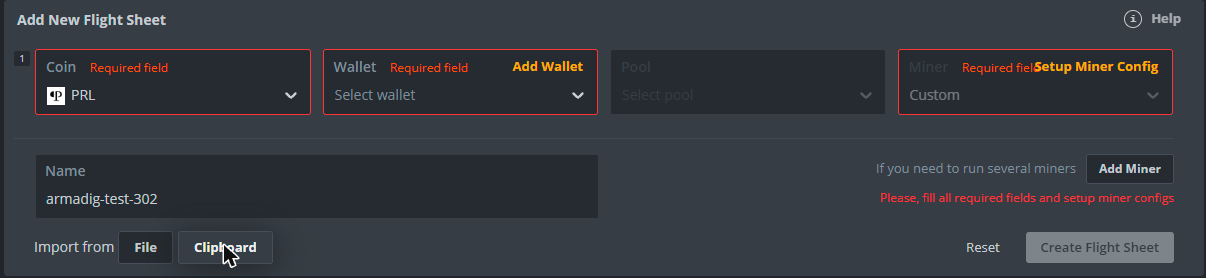
armadig-hiveos-flightsheet.json. It holds no wallet, only placeholders. - Flight Sheets → Import from: File. Or open the file, copy its text and use Import from: Clipboard.
- Pick your Pearl wallet and set Pool to
Configure in miner. - Open Setup Miner Config. Replace the Installation URL with the link from the release page (step 3). Replace
YOUR_QTC_ADDRESSwith your QTC address, or delete it to mine Pearl only. - Check that Hash algorithm shows
----. Then Create Flight Sheet.
By hand
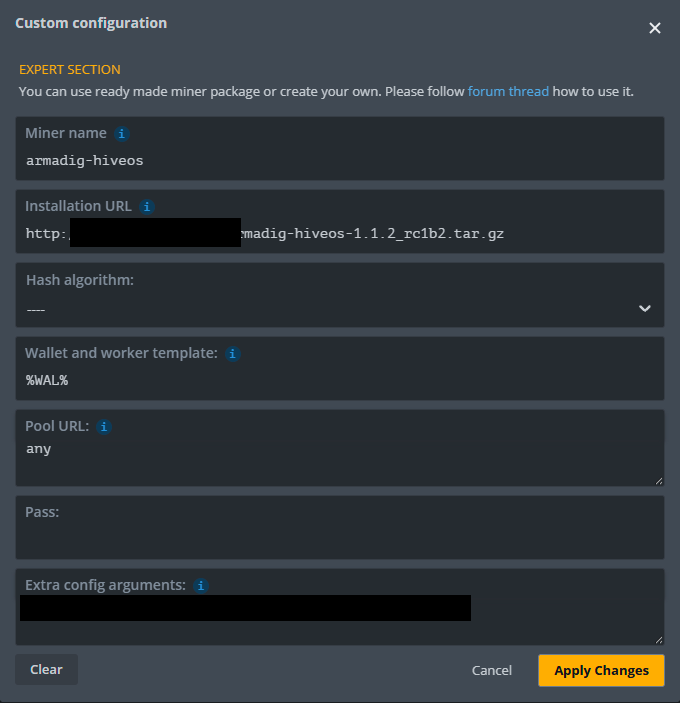
Flight Sheets, one row: Coin PRL, your Pearl wallet, Pool Configure in miner, Miner Custom. Then click Setup Miner Config and fill in:
| Field | Value | Why |
|---|---|---|
| Installation URL | https://github.com/armadig/Armadig-Miner/releases/download/<tag>/armadig-hiveos-<version>.tar.gz | Copy the real link from the release page (step 3). |
| Miner name | armadig-hiveos | Hive fills it in from the link. Leave it: Hive refuses any other name. |
| Hash algorithm | ---- (empty) | Hive puts pearlhash here by itself. With pearlhash every card mines Pearl only, even where QTC pays more. |
| Wallet and worker template | %WAL% | Hive requires this field. %WAL%.rig1 also names the worker. Keep the name neutral: pools show it publicly. |
| Pool URL | any | Hive requires this field. any = the fastest approved pool for each coin. |
| Pass | empty | Not needed. |
| Extra config arguments | QTC_ADDRESS | Your QTC address. Without it the rig mines Pearl only. |
Apply Changes, give the Flight Sheet a name, Create Flight Sheet.
Step 3. Get and check the download link (2 minutes)
- Open the latest release on GitHub. Right-click the file
armadig-hiveos-<version>.tar.gzand copy the link. - Paste the link into the address bar of a browser. The file must start to download. A "Not Found" page means a wrong link: copy it again.
- Paste the link into Installation URL. Miner name must change to
armadig-hiveosby itself.
Step 4. Start
- Open the worker, tab Flight Sheet, click the rocket button next to your Flight Sheet.
- Within about a minute Hive downloads the file, installs it and starts the miner. The very first time Hive also installs its custom-miner support, which takes a few minutes more on a slow CPU.
- The first start tunes every card, up to about 20 minutes. The log says
SAFE AUTO-TUNE. Mining goes on, and the hashrate grows while it tunes. The result is kept in/hive-config/armadig-hiveos/autotune.json, so later starts and updates use it at once.
Second coin, pinned cards, tariff
Everything else goes into Extra config arguments: one line, any order, the same words as the one-line form.
| You want | Extra config arguments |
|---|---|
| Pearl and QTC, each card on the coin that pays more | QTC_ADDRESS |
Pearl only: leave it empty, or set Hash algorithm to pearlhash | - |
| QTC only | QTC_ADDRESS algo qtc |
| Pin cards to coins (card numbers as in the miner log). A pinned card never switches | QTC_ADDRESS coin-map 0=pearl,1=qtc |
| Your own pools for the two coins | QTC_ADDRESS pearl-pool=HOST:PORT qtc-pool=HOST:PORT |
| You set memory clocks in the worker's Overclocking tab | mem-control none |
Electricity tariff and power supply: add them to the same line. The miner then picks the most profitable power limit for each tariff zone (Profit mode).
# your QTC address, a Gold 750 W power supply, 0.30 EUR per kWh at night, 0.38 EUR by day
QTC_ADDRESS gold,750w 0.30 eur 23-07 0.38 eur 07-23
Overclock and time zone
- Set your overclock in the worker's Overclocking tab. Why: when you link a rig to a farm, Hive applies the farm's overclock at once. An empty overclock resets core and memory offsets to 0, and the cards run slower.
- AMD cards: set the clocks and undervolt there too. Why: at stock clocks an RX 7800 XT reached 106 C junction in our test, and the miner paused it at its 105 C safety limit.
- Write the tariff hours in your farm's time zone. Why: Hive sets the rig clock to the farm's time zone (Farm → Settings → Timezone), and the miner reads the hours from the rig clock.
Update to a new version
- Copy the link of the new file from the new release page.
- Put it into Installation URL of your Flight Sheet and click Update, or create a new Flight Sheet with it. Hive installs the new version on every rig of that Flight Sheet and restarts the miner.
- Always use the new link. Why: Hive keeps downloaded files by file name and never downloads a name it already has. Every version has its own file name: do not rename the file and do not reuse an old link.
- The tune result is kept, so an update normally does not tune again.
Stop
Use Stop Miner in the miner menu, or miner stop in Hive Shell. The miner stops cleanly and puts the memory clock and the power limit back. Why: a hard kill (kill -9) leaves the memory clock locked. The next start of the miner clears it.
What the panel shows
- Miner
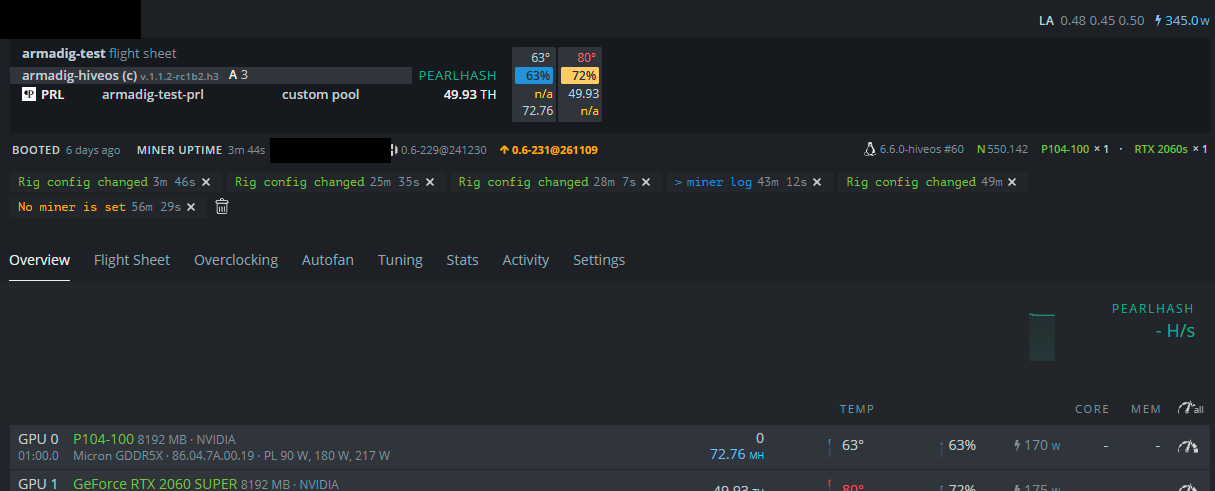
armadig-hiveos (c)with its version. A is the number of accepted shares. - Pearl cards in TH/s (
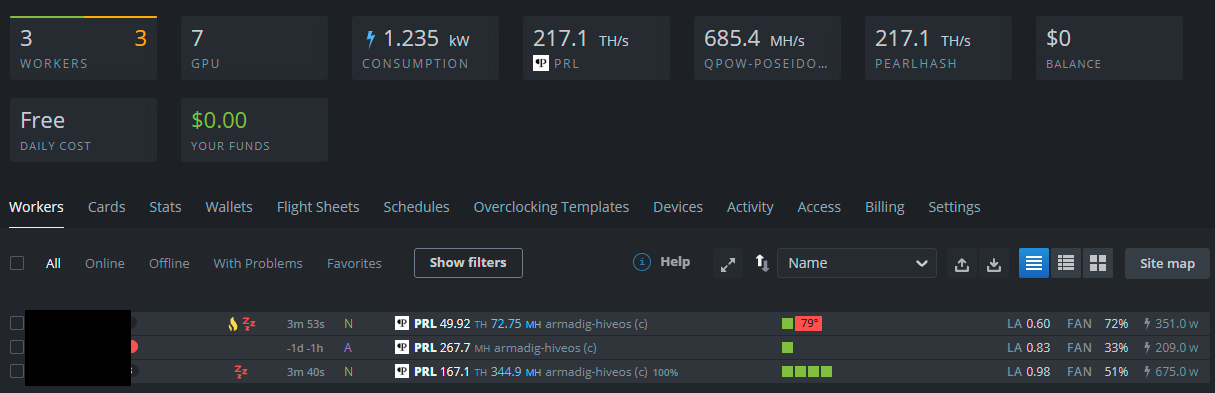
PEARLHASH), QTC cards in MH/s (QPOW-POSEIDON2). - Both coins on one rig look like a dual miner: the first number is the coin with the larger total (normally Pearl), the second number is the other coin. Each card shows its own coin; the other coin shows 0 or n/a. The worker list and the farm totals count both coins.
- A counts the shares of both coins together.
- One limit: the Coin column shows
PRLfor the whole rig, also when some cards mine QTC, because Hive takes it from the Flight Sheet.
Logs
- Miner Log in the miner menu: the miner's own console, one line per card every 5 seconds.
- In Hive Shell:
minershows the same console (Ctrl+A, then D, to leave it). The file is/var/log/miner/custom/armadig-hiveos.log. agent-screenshows the Hive agent. Armadig adds one line per coin there, for examplearmadig: QTC 343.31 MH/s on 2 card(s). No such line = Hive does not get the miner's numbers.
Tested
Tested on the real Hive panel with HiveOS 0.6-229 on three rigs: NVIDIA RTX 2060 SUPER, P104-100, CMP 30HX, CMP 90HX (unlocked driver) and AMD RX 7800 XT. AMD works: the package finds the AMD runtime by itself. The panel numbers matched the miner's console on every card. All supported cards: GPUs.
Troubleshooting
| You see | Do this |
|---|---|
| The worker shows 0 hashrate | Wait one minute after the start. Then open Miner Log: if it prints card lines, the panel follows within about 30 seconds. If the log stopped, the miner stopped: read its last lines. |
| All cards mine Pearl, even where QTC pays more | Hash algorithm is pearlhash: set it to ----. Check that your QTC address is in Extra config arguments. |
| Miner not found, or the old version still runs after an update | The link is wrong or old. Open it in a browser: the file must download. Use the link of the new release. Miner name must be armadig-hiveos. |
| After a stop the card keeps a locked memory clock | The miner was killed hard. Start it once and stop it with Stop Miner, or reboot the rig. |
| Cards slower than before, overclock gone | Hive applied the farm's overclock when the rig was linked. Set your overclock in the worker's Overclocking tab. |
The template field is required. The url field is required. | Wallet and worker template %WAL%, Pool URL any. |
Custom miner name should be "armadig-hiveos" | Miner name must be exactly armadig-hiveos, as Hive fills it in from the link. |
AMD card at 0, the log says no GPU index 0 | The rig has no AMD HIP runtime. Update HiveOS or install ROCm. The package looks in /opt/rocm/lib and in the folders of other custom miners. |
armadig-miner does not match SHA256SUMS | The file was changed or damaged. Use the file of the release. |